
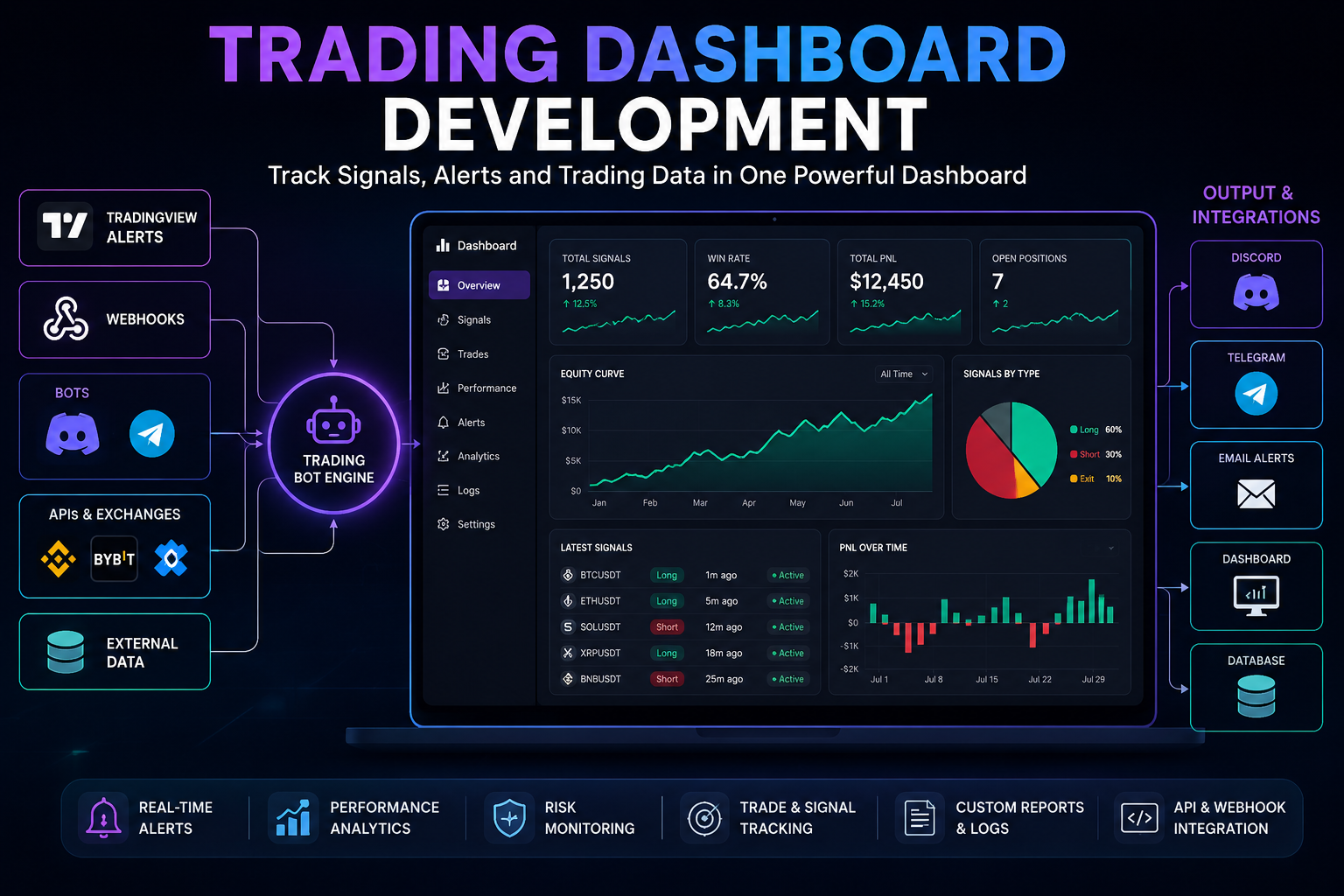
Trading Dashboard Development helps traders track signals, alerts, performance data and trading workflows in one place. Instead of switching between TradingView, Discord, Telegram, spreadsheets, bots and exchange data, a custom dashboard can centralize the most important trading information into one structured system.
In 30 Seconds
- Trading Dashboard Development centralizes signals, alerts, bots and trading data.
- Dashboards can track performance, open signals, logs, alerts and workflow activity.
- They can connect with TradingView, APIs, Discord, Telegram, databases and bots.
- As a result, traders and communities get a clearer view of their trading process.
What Is Trading Dashboard Development?
Trading Dashboard Development is the process of building custom dashboards for trading workflows. These systems can collect alerts, signals, trades, logs, API data and performance metrics, then display them in a clean interface.
For example, a dashboard can show active TradingView alerts, recent signals, win rate, total trades, drawdown, bot status, API activity, Discord notifications and Telegram updates. Because everything appears in one place, the trading workflow becomes easier to monitor.
In practice, a dashboard becomes the control center for trading automation, signal tracking and operational visibility.
Why Traders Build Custom Trading Dashboards
Many trading workflows are spread across too many tools. Signals may appear in TradingView, updates may go to Discord, alerts may reach Telegram and performance data may stay inside spreadsheets or exchange history.
A custom dashboard solves that problem by collecting data from multiple systems and presenting it in one interface. Therefore, traders can review signals, monitor bot activity and analyze performance without opening every platform separately.
Signal Tracking
Track recent signals, active alerts, market conditions and trading workflow events.
Performance Analytics
Monitor win rate, drawdown, profit metrics, trade history and signal performance.
Bot Monitoring
Review trading bot status, webhook activity, failed alerts and API logs.
Workflow Visibility
Connect alerts, bots, APIs and databases into one operational trading view.
What Can a Trading Dashboard Track?
A trading dashboard can track many parts of the trading process. However, the best dashboards focus on the information that improves visibility, reduces confusion and supports better workflow management.
- TradingView alerts received through webhooks.
- Signal history with symbol, direction, timeframe and timestamp.
- Active setups across selected markets or strategies.
- Bot activity including status, logs, errors and notifications.
- Performance metrics such as win rate, result, drawdown and trade count.
- Risk data including invalidation levels, exposure and alert status.
- API events from exchanges, databases or external systems.
- Discord and Telegram delivery for signal notifications.
- Webhook logs showing received alerts and processed messages.
- Custom reports for trading reviews, communities or internal tracking.
Example Trading Dashboard Workflow
- First, TradingView sends an alert through a webhook.
- Then, a bot or API receives the alert payload.
- Next, the system validates and formats the signal data.
- After that, the signal appears inside the trading dashboard.
- Meanwhile, Discord or Telegram notifications can be sent automatically.
- The dashboard stores the event in a database.
- Finally, the trader can review signals, logs and performance from one interface.
Trading Dashboard Development vs Spreadsheets
Spreadsheets can work for simple tracking, especially at the beginning. However, they become limited when the workflow includes real-time alerts, APIs, bots, multiple users, automated logs and live signal updates.
By contrast, a custom dashboard can receive live data, organize it automatically and display the current state of the trading system. As a result, it becomes more useful for active traders, educators and communities that need operational visibility.
Spreadsheets vs Custom Dashboards
Spreadsheet Tracking
- Manual data entry
- Limited automation
- Harder real-time monitoring
- No native bot logs
- Less useful for communities
Custom Dashboard
- Automated data collection
- Live signal tracking
- API and webhook support
- Bot and system monitoring
- Better workflow visibility
API Integrations for Trading Dashboards
API integrations are the foundation of most trading dashboards. Through APIs and webhooks, a dashboard can collect data from TradingView, trading bots, exchanges, databases, analytics tools, Discord, Telegram and other external systems.
For example, TradingView can send alert data into a backend API. Then, the system can store the signal, update the dashboard and send a notification to a Discord channel or Telegram group. In addition, exchange or database APIs can provide extra context for reporting and analysis.
This creates a connected workflow where trading data moves automatically instead of being copied manually.
Trading Dashboards for Discord and Telegram Communities
Trading communities often need clear signal history, consistent reporting and reliable alert delivery. In that context, a dashboard can help community owners track what was sent, when it was sent and which platform received the update.
Instead of relying only on channel history, the dashboard can store signals in a structured database. As a result, analysts can review past alerts, monitor bot delivery and prepare performance summaries for members.
This is especially useful for paid communities, trading educators, signal groups and private analyst teams.
When Should You Build a Trading Dashboard?
A trading dashboard makes sense when the workflow produces more data than one person can comfortably monitor manually. It is especially useful when signals, alerts, bots and performance data need to work together.
However, a dashboard should not be built only because it looks professional. First, define what needs to be tracked. Then, build the dashboard around the data that actually supports the trading process.
- Signals are published across Discord or Telegram.
- TradingView alerts need structured tracking.
- Webhook logs should be stored and reviewed.
- Bot activity needs monitoring.
- Performance data is difficult to manage manually.
- Multiple systems send trading information.
- Communities need signal history or reports.
- API data should appear in one interface.
- Risk alerts require better visibility.
- Trading workflows need central control.
Common Trading Dashboard Development Projects
Most dashboard projects start from a visibility problem. The goal is not to show every possible metric, but to display the information that helps traders understand what is happening inside their workflow.
Signal Dashboard
Track active alerts, recent signals, symbols, timeframes, direction and signal status.
Bot Activity Monitor
Review webhook events, failed messages, Discord delivery and Telegram notifications.
Performance Dashboard
Monitor win rate, trade count, drawdown, results and strategy-level performance metrics.
API Data Dashboard
Connect trading systems with exchanges, databases, reports and external analytics tools.
Dashboard Metrics That Matter
A good trading dashboard should avoid unnecessary noise. Too many metrics can make the system harder to use. Instead, the interface should focus on the data that supports decisions, monitoring and workflow control.
Useful metrics may include signal count, active alerts, delivery status, bot errors, performance by strategy, drawdown, win rate, market exposure and recent workflow events. In addition, custom reports can summarize the data for communities or internal reviews.
Therefore, the dashboard design should follow the trading process, not generic analytics templates.
How Luminova Ventures Builds Trading Dashboards
Luminova Ventures builds trading dashboards around real workflows. The focus is practical visibility: signal tracking, alert monitoring, API integrations, bot logs, Discord delivery, Telegram notifications, database storage and performance analytics.
Typical projects include TradingView signal dashboards, trading bot dashboards, Discord signal tracking, Telegram alert monitoring, webhook logs, API reporting systems and custom analytics panels.
- Trading Bot Development
- TradingView Alert Workflows
- Pine Script Automation
- Custom Indicator Development
- Business API Integration
- AI Analytics Dashboard
- Free Automation Audit
Frequently Asked Questions About Trading Dashboard Development
What is Trading Dashboard Development?
Trading Dashboard Development means building custom dashboards that track trading signals, alerts, performance data, bot activity, APIs, logs and workflow events.
Can a dashboard track TradingView alerts?
Yes. Through webhooks, TradingView alerts can move into a backend system and appear inside a dashboard with symbol, direction, timeframe, status and timestamp.
Can dashboards connect with Discord and Telegram?
Yes. A dashboard can track Discord and Telegram alert delivery, store message history and show whether signal notifications were sent successfully.
Do trading dashboards require API integrations?
Usually, yes. APIs and webhooks are often needed to collect data from TradingView, bots, exchanges, databases and notification platforms.
Who should use a custom trading dashboard?
Custom dashboards are useful for traders, trading communities, educators, analysts and teams that need better visibility over signals, bots, alerts and performance data.
Build a Trading Dashboard for Your Workflow
Request a free Automation Audit and discover how a custom trading dashboard can connect signals, alerts, APIs, bots, Discord and Telegram into one clear system.
Request Free Automation AuditLooking for more practical AI, automation and software development resources?
← Back to Knowledge Base