
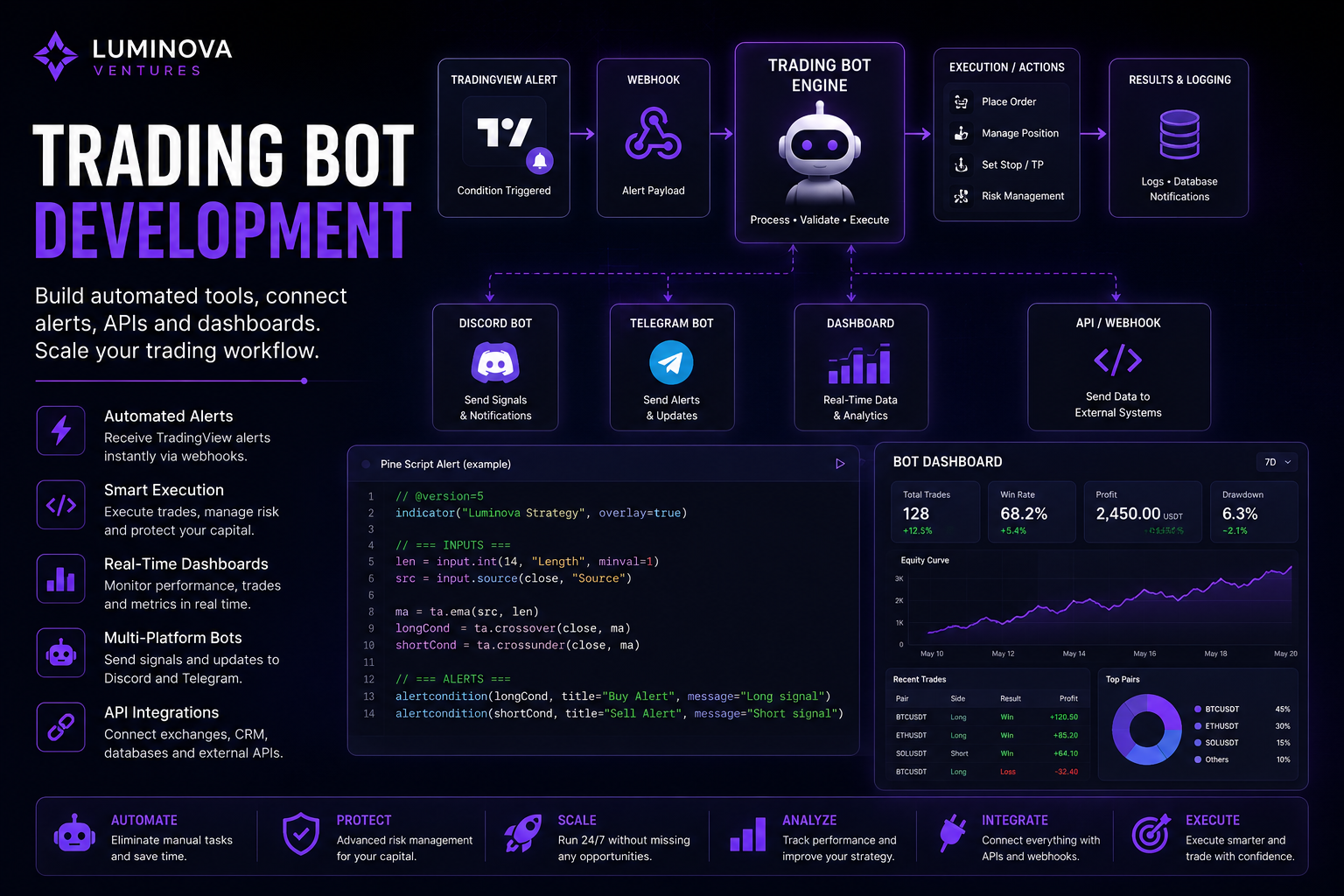
Trading Bot Development helps traders build automated alerts, execution tools, dashboards and workflow integrations. Instead of managing every signal, notification and system update manually, a custom bot can connect TradingView alerts, APIs, Discord, Telegram, databases and analytics dashboards into one structured workflow.
In 30 Seconds
- Trading Bot Development connects alerts, APIs, dashboards and notification systems.
- In addition, custom bots automate signal routing, risk alerts, reporting and workflow logic.
- They also integrate with Discord, Telegram, TradingView, databases and APIs.
- As a result, the best trading bots support a clear process instead of replacing strategy thinking.
What Is Trading Bot Development?
Trading Bot Development is the process of building custom software tools that support trading workflows. These systems can receive alerts, process market data, route signals, notify users, log results, update dashboards and connect with external APIs.
In practice, a trading bot does not need to execute trades automatically. Many professional systems start with alert routing, signal validation, Discord notifications, Telegram updates, reporting dashboards and risk monitoring.
As a result, traders and communities can create a faster, cleaner and more repeatable workflow around their strategy.
Why Traders Build Custom Trading Bots
Manual trading workflows become difficult to manage when signals, alerts, dashboards and community updates happen across several platforms. For example, traders may need to monitor charts, copy signals, post updates, track performance and notify members at the same time.
Custom trading bots reduce that manual workload. After receiving structured alerts, they can process data automatically and send the right message to the right platform. Therefore, the trader can focus more on decision-making and less on repetitive system tasks.
Automated Alerts
Receive TradingView alerts and route them to Discord, Telegram, dashboards or APIs.
Signal Processing
Validate alert data, format messages and apply custom trading workflow rules.
Dashboard Tracking
Store signals, trades, logs and performance data inside custom dashboards.
Workflow Integration
Connect trading tools with webhooks, databases, APIs and notification systems.
What Can a Trading Bot Do?
In practice, trading bots can support many parts of the trading process. However, the most useful systems usually solve one clear workflow problem: faster alerts, cleaner execution tracking, better reporting or automatic communication with a trading community.
- TradingView alert routing through webhooks and custom APIs.
- Discord signal bots for private trading communities.
- Telegram alert bots for real-time mobile notifications.
- Risk alerts for invalidation, stop loss, volatility or position conditions.
- Signal databases for storing historical alerts and setups.
- Dashboards for monitoring trading activity, logs and results.
- API integrations with exchanges, analytics tools or internal systems.
- Performance tracking for signals, strategies and workflow analytics.
- Community notifications for updates, status changes and announcements.
- Execution support tools for structured trade management workflows.
Example Trading Bot Workflow
- First, a TradingView alert detects a market condition.
- Then, the alert sends data through a webhook.
- Next, the trading bot receives and validates the alert payload.
- After that, the bot applies custom logic, risk rules or filtering.
- Once the data is checked, the system formats the signal message.
- Meanwhile, the signal goes to Discord, Telegram, a dashboard or another API.
- Finally, the bot logs the event in a database for later review.
Trading Bots vs Simple Alert Systems
A simple alert system only sends a notification when something happens. This can work for basic workflows, but it becomes limited when traders need validation, formatting, routing, storage, analytics or multi-platform delivery.
By contrast, a trading bot can process incoming data, apply rules, connect multiple services and create a complete workflow around the signal. As a result, it becomes a system layer between market alerts and trading operations.
Simple Alerts vs Trading Bots
Simple Alert System
- Sends basic notifications
- Limited routing options
- No custom validation
- No database logging
- Hard to scale across platforms
Trading Bot System
- Processes structured alerts
- Routes signals to multiple platforms
- Applies custom workflow logic
- Stores events and logs
- Connects APIs, dashboards and bots
Trading Bot Development and API Integrations
API integration is one of the most important parts of trading bot development. Through APIs, the bot can connect with external systems such as exchanges, data providers, dashboards, databases, Discord, Telegram and internal tools.
For example, the system can receive TradingView alerts, check an external data source, log the signal in a database and send a formatted notification to Discord. In more advanced systems, APIs can also support execution workflows, reporting and risk monitoring.
However, execution systems need careful design. Any automated order workflow should include strict validation, risk controls, logging and manual oversight where needed.
Trading Bots for Discord and Telegram Communities
Trading communities often need fast and consistent communication. In that context, a trading bot can send structured signals, setup updates, risk alerts and market notifications directly into Discord channels or Telegram groups.
This is useful for educators, analysts, paid communities and private groups. Instead of manually copying alerts across platforms, the bot delivers messages automatically and keeps the signal format consistent.
In addition, bots can support onboarding, member notifications, role-based channels, premium access workflows and signal history tracking.
When Should You Build a Trading Bot?
Overall, a trading bot makes sense when the workflow is repetitive, time-sensitive or difficult to manage manually. In particular, it becomes useful when alerts, signals, dashboards and community updates need to work together.
However, a bot should not be built before the trading process is clear. First, define the workflow. Then, automate the parts that are repetitive, structured and valuable.
- Many TradingView alerts arrive every day.
- The workflow includes a Discord or Telegram trading community.
- Signal formatting needs to stay consistent.
- Alerts and signals should be stored in a database.
- A dashboard is needed for trades, signals or logs.
- TradingView needs to connect with APIs or webhooks.
- Risk alerts or status notifications are part of the process.
- Manual signal posting takes too much time.
- Trading tools need workflow automation.
- The process is clear enough to define in rules.
Common Trading Bot Development Projects
Most trading bot projects start with a practical operational problem. The goal is not to build a complex bot just because automation sounds impressive. Instead, the goal is to make the workflow faster, safer and easier to manage.
TradingView Signal Bot
Receive TradingView alerts through webhooks and send structured signals to Discord or Telegram.
Risk Alert Bot
Monitor invalidation levels, volatility, setup status or custom risk conditions.
Trading Dashboard
Track signals, logs, trade status, performance data and system activity in one place.
API Workflow Bot
Connect trading systems with external APIs, databases, tools and reporting workflows.
Execution Bots and Risk Controls
Some trading bots support execution workflows, but execution automation requires a stricter architecture than simple alerts. Any system that places orders or manages positions must include validation, permissions, risk limits, logging and failure handling.
For many traders, the safer first step is not full execution automation. Instead, they can start with alert automation, dashboard tracking and manual confirmation. This creates a controlled workflow before moving toward more advanced execution systems.
Therefore, trading bot development should improve process control, not remove responsibility from the trader.
How Luminova Ventures Builds Trading Bots
Luminova Ventures builds trading bot systems around real workflows. The focus is practical automation: alert routing, structured notifications, API integrations, dashboards, logging, Discord bots, Telegram bots and TradingView workflows.
Typical projects include TradingView webhook bots, Discord signal bots, Telegram alert bots, API integrations, trading dashboards, risk alert systems, Pine Script alert logic and custom workflow automation. In short, the system is built around the client’s actual process, not around generic bot features.
- TradingView Alerts Automation
- Pine Script Automation
- Custom TradingView Indicator
- Discord Automation
- Telegram Automation
- Business API Integration
- Free Automation Audit
Frequently Asked Questions About Trading Bot Development
What is Trading Bot Development?
Trading Bot Development means building software tools that support trading workflows through alerts, APIs, dashboards, notifications, signal routing, logging and automation.
Can a trading bot connect TradingView with Discord?
Through webhooks, TradingView alerts can move into a custom bot. After that, the bot sends formatted signal messages to Discord channels automatically.
Can a trading bot send Telegram alerts?
Telegram alerts can go to private chats, groups or channels based on TradingView alerts, API data or custom workflow conditions.
Does every trading bot place trades automatically?
No. Many systems only automate alerts, notifications, dashboards, logging and workflow management. Therefore, automated execution should be treated as a separate and more advanced use case.
Is a custom trading bot useful for trading communities?
For trading communities, bots can publish alerts, send updates, manage notifications, track signals and keep communication consistent across Discord and Telegram.
Build a Trading Bot for Your Workflow
Request a free Automation Audit and discover how a custom trading bot can connect alerts, APIs, dashboards, Discord and Telegram into one automated workflow.
Request Free Automation AuditLooking for more practical AI, automation and software development resources?
← Back to Knowledge Base