
TradingView Alerts Automation connects market signals with Discord, Telegram, webhooks and custom trading workflows. Instead of watching charts manually all day, traders and communities can send real-time alerts from TradingView into automated notification systems, signal bots and internal dashboards.
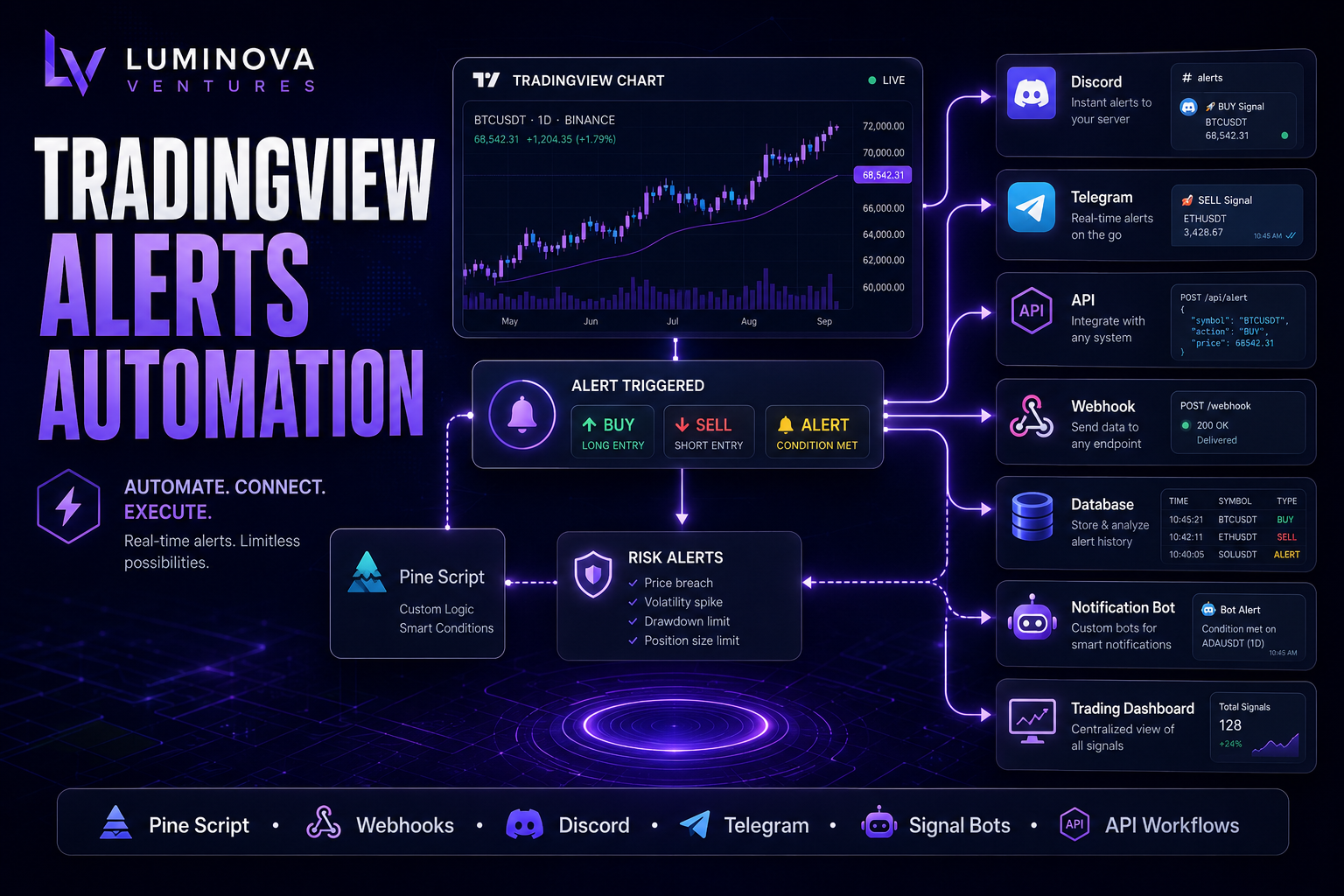
In 30 Seconds
- TradingView Alerts Automation sends market signals to external systems in real time.
- As a result, alerts can trigger Discord messages, Telegram notifications, webhooks and dashboards.
- Pine Script defines custom trading conditions before an alert fires.
- Therefore, automated alerts help traders react faster and manage communities more efficiently.
What Is TradingView Alerts Automation?
TradingView Alerts Automation connects TradingView alerts with external platforms such as Discord, Telegram, APIs, databases and custom trading dashboards. When a market condition appears, TradingView sends an alert and starts an automated workflow.
This allows traders, educators and trading communities to distribute market signals without manually copying chart information or posting updates. For example, a single alert can notify a private Discord channel, send a Telegram message, update a signal database and trigger a custom bot workflow.
For professional communities, alert automation creates a more reliable process for delivering market information quickly and consistently. In addition, it helps analysts avoid repetitive posting and focus on market interpretation.
Why Traders Automate TradingView Alerts
Markets move quickly. When a setup appears, delays matter. Manual alerts, screenshots and copied messages can create missed opportunities, inconsistent communication and unnecessary workload for analysts.
Automated alert workflows solve this problem by sending structured signals immediately after predefined market conditions appear. As a result, private trading groups, Discord communities, Telegram channels, educational platforms and internal research dashboards can receive the same information at the same time.
Faster Signal Delivery
Send market alerts instantly to Discord, Telegram or custom dashboards.
Structured Alerts
Format signals with symbol, direction, price, timeframe and conditions.
Community Automation
Deliver market updates to private groups without manual posting.
Custom Logic
Use Pine Script conditions to decide when alerts should fire.
Common Use Cases for Automated Trading Alerts
Automated trading alerts can support both individual traders and larger communities. The most valuable use cases usually involve repeatable market conditions, time-sensitive notifications and structured signal delivery.
- Discord signal channels for private trading communities.
- Telegram trading alerts sent directly to mobile devices.
- Pine Script indicators that trigger custom alert logic.
- Market structure alerts based on breakouts, sweeps or trend changes.
- Risk alerts for price levels, volatility or invalidation zones.
- Signal history databases for reviewing past alerts.
- Trading dashboards that display active signals in one place.
- Webhook integrations with bots, APIs and automation workflows.
- Educational communities where analysts publish structured updates.
- Multi-platform notifications across Discord, Telegram and email.
Example TradingView Alert Workflow
- A Pine Script indicator detects a market condition.
- Then, TradingView triggers an alert.
- The alert goes through a webhook.
- A custom API receives and validates the alert data.
- Next, the system formats the signal message.
- A Discord or Telegram bot sends the alert to the correct channel.
- Finally, the system stores the signal in a database for tracking and review.
Manual Signal Posting vs Alert Automation
Manual signal posting can work when alerts are rare. However, as a trading community grows, analysts may need to send multiple updates across several platforms. This creates delays, inconsistent formatting and higher risk of mistakes.
Automated alert systems make signal delivery consistent. Every alert follows the same structure, reaches the right channel and creates a reliable record for later analysis.
Manual Signals vs Automated Alerts
Manual Signals
- Delayed posting
- Inconsistent formatting
- Higher error risk
- Hard to manage multiple platforms
- No structured signal history
Alert Automation
- Instant delivery
- Structured message format
- Consistent execution
- Discord and Telegram support
- Database and dashboard tracking
Technology Stack for TradingView Alert Workflows
Professional alert automation usually includes more than a simple webhook. A reliable workflow may use Pine Script, TradingView alerts, Python, APIs, databases, Discord bots, Telegram bots, logging and monitoring.
For trading communities, this creates complete alert infrastructure. First, the system detects market signals. Then, it validates and delivers them. Finally, it stores the data for review, analytics and performance tracking.
When Should Traders Use Alert Automation?
Traders should use alert automation when market updates need to reach people quickly and consistently. This is especially important for communities, paid groups, trading educators and analysts who publish signals to multiple platforms.
In practice, the stronger the workflow depends on timing, the more valuable automated alert delivery becomes. Therefore, signal communities usually benefit from automation earlier than individual traders.
- Signals must reach Discord or Telegram instantly.
- Alerts need consistent message formatting.
- TradingView conditions already exist in Pine Script.
- Multiple channels or groups need the same update.
- Signal history should be stored in a database.
- Analysts want to reduce manual posting.
- Trading communities need structured alert delivery.
- Custom risk alerts should notify members automatically.
TradingView Alerts and Pine Script
Pine Script is the language used to create custom indicators and strategies inside TradingView. It allows traders to define specific market conditions that can later trigger alerts.
For example, an indicator can detect a breakout, a liquidity sweep, a session level, a trend change or a custom market structure condition. Once that condition appears, the alert can move into an automated workflow.
TradingView also provides webhook alerts. Because of that, traders can connect chart-based signals with bots, dashboards, APIs and external notification systems.
How Luminova Ventures Builds TradingView Alert Systems
Luminova Ventures builds custom alert systems for traders, educators and trading communities. The goal is to turn TradingView signals into reliable workflows that deliver market information quickly and clearly.
Typical projects include Pine Script alert logic, Discord signal bots, Telegram alert bots, webhook APIs, signal databases, risk alerts and custom trading dashboards. As a result, communities can publish alerts faster and manage signal delivery with less manual effort.
- Discord Automation
- Telegram Automation
- Business API Integration
- Python Infrastructure Automation
- Free Automation Audit
Frequently Asked Questions About TradingView Alerts Automation
What is TradingView Alerts Automation?
TradingView Alerts Automation connects TradingView alerts with external systems such as Discord, Telegram, webhooks, APIs and custom dashboards so market signals can be delivered automatically.
Can TradingView alerts send messages to Discord?
Yes. TradingView alerts can go through webhooks to a custom API or bot. Then, that system can publish formatted messages inside Discord channels.
Can TradingView alerts send notifications to Telegram?
Yes. TradingView alerts can trigger Telegram bots that send real-time market signals, risk alerts or trading updates to channels, groups or private chats.
Do automated alerts require Pine Script?
Pine Script is not always required. However, it is useful when traders need custom alert conditions beyond standard TradingView price alerts.
Automate Your TradingView Alerts
Request a free Automation Audit and discover how custom alert workflows can connect TradingView signals with Discord, Telegram and trading dashboards.
Request Free Automation AuditLooking for more practical AI, automation and software development resources?
← Back to Knowledge Base