
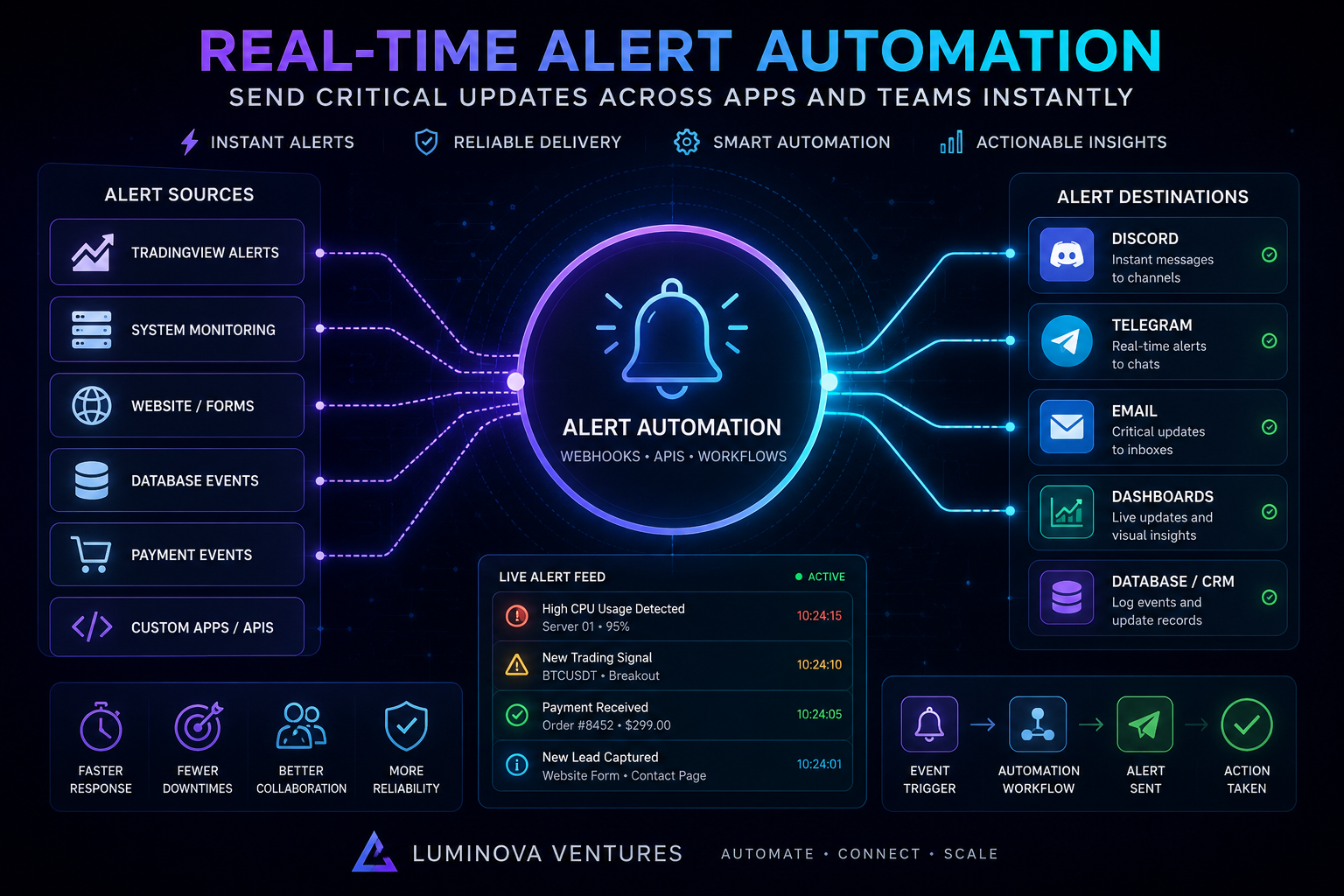
Real-Time Alert Automation sends critical updates across apps, bots, dashboards and teams instantly. Instead of checking every platform manually, companies and trading communities can use automated alerts to detect events, route messages and notify the right people at the right time.
In 30 Seconds
- Real-Time Alert Automation sends instant updates when important events happen.
- Alerts can connect apps, APIs, bots, dashboards, Discord, Telegram and email.
- Teams can monitor system events, sales activity, trading alerts and workflow status.
- As a result, businesses react faster and reduce manual checking across tools.
What Is Real-Time Alert Automation?
Real-Time Alert Automation means creating workflows that send instant notifications when important events occur. These events can come from apps, APIs, databases, forms, payment systems, trading alerts, monitoring tools or custom software.
For example, a website form can notify the sales team, a server issue can trigger a technical alert, and a TradingView signal can send a message to Discord or Telegram. In each case, the system detects the event and sends the update without manual action.
Therefore, alert automation helps teams move faster, avoid missed updates and keep operational workflows under control.
Why Real-Time Alerts Matter
Many teams lose time because important updates are hidden across too many tools. Leads arrive in forms, customer messages stay in inboxes, system errors appear in logs and trading alerts stay inside chart platforms.
Real-time alerts solve that problem by moving critical information directly to the right destination. For example, the system can send a lead notification to Slack, a trading signal to Telegram, a payment alert to email and a technical warning to a dashboard.
As a result, teams can respond faster without checking every platform manually.
Instant Notifications
Send critical updates immediately when leads, alerts, payments or system events happen.
Smarter Routing
Deliver each alert to the correct app, team, channel, bot or dashboard.
Better Monitoring
Track system health, trading alerts, workflow status and operational events.
Faster Response
Reduce delays by notifying teams before issues, requests or signals get missed.
What Can Real-Time Alert Automation Do?
Alert automation can support many business, technical and trading workflows. However, the best systems focus on important events that need fast attention, clear routing and reliable delivery.
- Lead alerts from website forms, landing pages and contact requests.
- System monitoring alerts for servers, APIs, databases and failed jobs.
- TradingView alerts routed to Discord, Telegram, dashboards or databases.
- Payment notifications for invoices, subscriptions and customer events.
- CRM updates when deals, tickets or customer records change.
- Discord notifications for communities, teams and private groups.
- Telegram alerts for mobile updates and trading notifications.
- Email alerts for critical business or operational events.
- Dashboard updates showing live workflow status and event history.
- Error logs for failed workflows, broken webhooks and API problems.
Example Alert Automation Workflow
- First, an event happens inside an app, API or monitoring tool.
- Then, the system sends event data through a webhook or API.
- Next, the automation layer validates the incoming payload.
- After that, the workflow decides where the alert should go.
- Meanwhile, the event can be stored inside a database or dashboard.
- The alert reaches Discord, Telegram, email or another team channel.
- Finally, the system logs the delivery status for monitoring and review.
Manual Checking vs Automated Alerts
Manual checking works only when the workflow is small. However, it becomes unreliable when a team needs to monitor several tools, dashboards, inboxes, apps, channels and data sources at the same time.
By contrast, automated alerts push important information to the right place immediately. Because of that, teams can stop searching for updates and start responding to them.
Manual Checking vs Alert Automation
Manual Checking
- Requires constant monitoring
- Important updates can be missed
- Teams switch between many tools
- Response times are slower
- No structured alert history
Alert Automation
- Sends instant notifications
- Routes alerts to the right channel
- Connects apps, APIs and bots
- Improves response speed
- Stores events and delivery logs
Alert Automation for Business Workflows
Business teams often need fast updates about leads, customers, payments, support issues and internal processes. Without automation, employees need to check multiple tools and manually notify each other.
With alert automation, the workflow reacts as soon as something important happens. For example, a new lead can trigger a CRM update, a Telegram notification, an email message and a dashboard record at the same time.
This makes real-time alerts useful for sales, support, operations, finance, onboarding and internal coordination.
Alert Automation for Trading and Crypto Workflows
Trading workflows are highly time-sensitive. A market alert, signal update or risk event may need to reach Discord, Telegram or a dashboard immediately.
For example, TradingView alerts can trigger webhook workflows that send structured signals to private channels, store the event in a database and update a trading dashboard.
As a result, traders and communities can reduce manual signal posting and create a more reliable alert delivery process.
Real-Time Alerts for System Monitoring
Technical systems also need instant alerting. APIs can fail, servers can slow down, databases can stop responding and background jobs can break without visible warning.
Alert automation helps teams detect those issues earlier. For example, a monitoring system can send an alert to Discord, Telegram or email when CPU usage spikes, a webhook fails or an API response changes.
In addition, dashboards can store those events so teams can review patterns, uptime and recurring problems later.
Webhook and API Alert Routing
Webhooks and APIs form the core of most real-time alert systems. A webhook can send event data instantly, while an API can validate, transform, store and route that data.
For example, a payment system can send a webhook when a subscription changes. Then, a backend API can update the CRM, notify the support team and store the event in a database.
Therefore, reliable alert automation usually needs more than a simple notification. It also needs validation, routing logic, error handling, retries and logs.
When Should You Use Real-Time Alert Automation?
Real-time alert automation makes sense when an event needs fast attention or when manual checking creates delays. It works especially well when several systems need to react to the same event.
However, the workflow should be clear before automation begins. First, define the event. Then, choose the destination and decide what action should happen next.
- Leads need instant sales notifications.
- Trading alerts should reach Discord or Telegram.
- System errors need immediate technical attention.
- Payment events should update records and teams.
- Dashboards need live operational data.
- Teams miss updates because tools are disconnected.
- Webhook failures require monitoring and logs.
- Customer requests need faster internal routing.
- Critical events should create database records.
- Notifications should reach the right people automatically.
Common Real-Time Alert Automation Projects
Most alert projects start with one recurring communication problem. The goal is not to notify everyone about everything. Instead, the system should send the right update to the right place with enough context to take action.
Lead Alert Workflow
Send website form submissions to CRM, email, Telegram, Discord or dashboards.
Trading Signal Alerts
Route TradingView alerts to Discord, Telegram, signal databases and dashboards.
System Monitoring Alerts
Notify teams when APIs, servers, databases, bots or background jobs fail.
Payment Event Alerts
Trigger notifications, records and internal workflows after billing or customer events.
Alert Reliability, Logs and Delivery Tracking
A good alert system should do more than send messages. It should also track delivery, log failed requests, validate data and make troubleshooting easier.
For example, if a webhook fails, the system should record the error and notify the right person. In addition, retries and fallback channels can help reduce missed critical updates.
Because of that, alert automation should be treated as operational infrastructure, not just as a notification shortcut.
How Luminova Ventures Builds Alert Automation Systems
Luminova Ventures builds real-time alert automation around practical workflows. The focus is clear event detection, reliable routing, useful notifications, dashboards, logs and integrations with the tools teams already use.
Typical projects include webhook alert systems, Discord notification bots, Telegram alerts, TradingView signal routing, system monitoring, CRM notifications, dashboard updates and custom API workflows.
- Webhook Automation
- Business API Integration
- Discord Bot Automation
- Telegram Alert Systems
- TradingView Alert Workflows
- AI Infrastructure Monitoring
- Free Automation Audit
Frequently Asked Questions About Real-Time Alert Automation
What is Real-Time Alert Automation?
Real-Time Alert Automation means creating workflows that send instant updates when important events happen across apps, APIs, bots, dashboards and teams.
Can alerts go to Discord or Telegram?
Yes. Alerts can trigger Discord bots, Telegram messages, email notifications, dashboard updates or database records depending on the workflow.
Can alert automation work with TradingView?
Yes. TradingView alerts can send webhook data to a custom endpoint, which can then route signals to Discord, Telegram, dashboards or databases.
Can businesses use real-time alerts outside trading?
Yes. Businesses can use real-time alerts for leads, payments, CRM updates, support tickets, system monitoring, customer onboarding and internal operations.
Do alert systems need custom software?
Simple alerts can use automation platforms. However, custom software works better when workflows need validation, routing logic, security, logs, retries and dashboards.
Build Real-Time Alerts for Your Workflow
Request a free Automation Audit and discover how real-time alert automation can connect apps, APIs, bots, dashboards, Discord, Telegram and teams into one faster system.
Request Free Automation AuditLooking for more practical AI, automation and software development resources?
← Back to Knowledge Base