
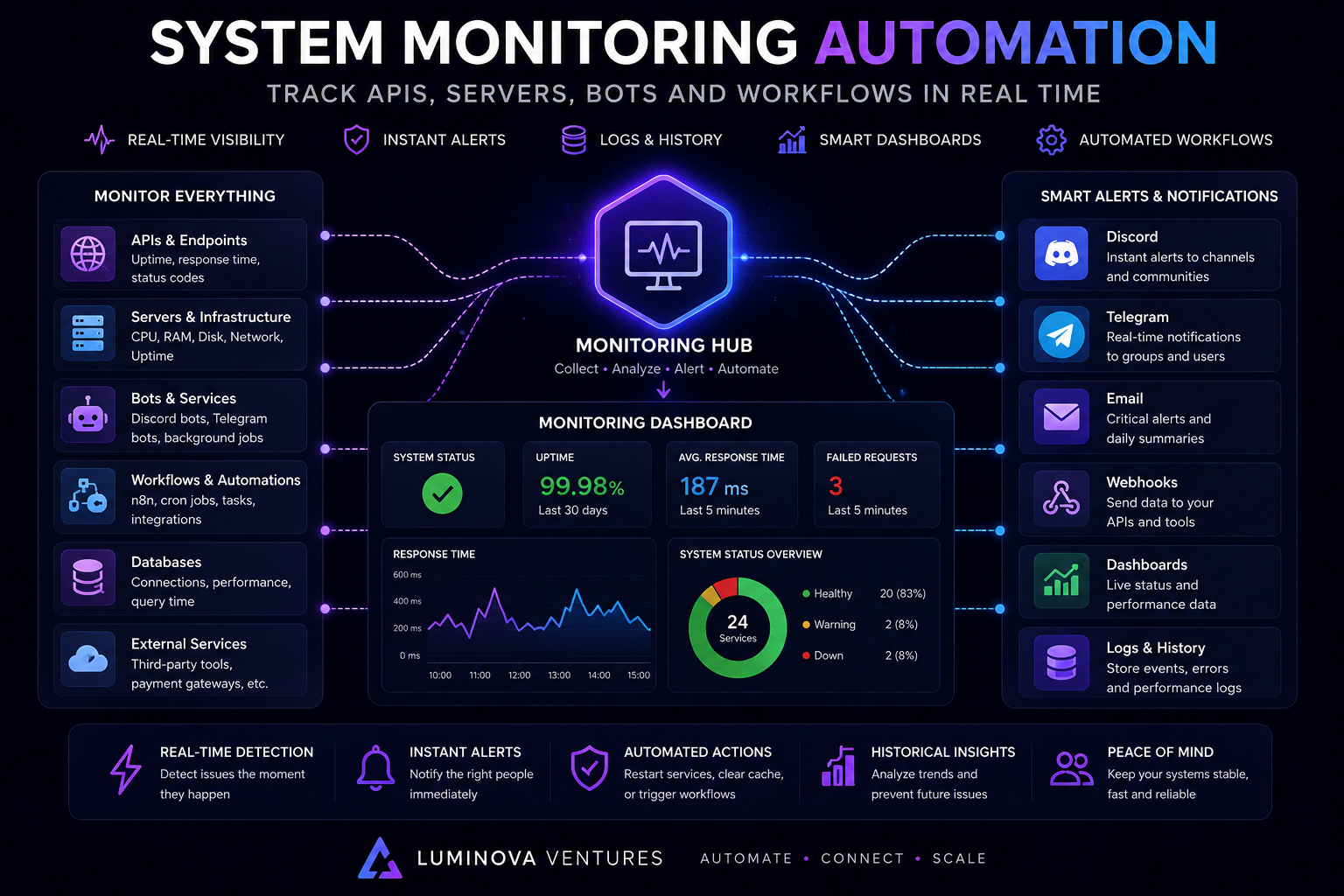
System Monitoring Automation tracks APIs, servers, bots and workflows with alerts, logs and dashboards. Instead of checking systems manually, teams can monitor uptime, errors, response times, failed jobs and automation health from one connected workflow.
In 30 Seconds
- System Monitoring Automation tracks APIs, servers, bots, workflows and databases.
- Automated monitoring can detect downtime, failed jobs, errors and slow responses.
- Alerts can reach Discord, Telegram, email, dashboards or internal systems.
- As a result, teams can react faster and keep critical workflows stable.
What Is System Monitoring Automation?
System Monitoring Automation means creating workflows that track software systems automatically. These workflows can monitor APIs, servers, bots, databases, background jobs, webhook endpoints and business automations.
For example, a monitoring system can check whether an API responds correctly, whether a Discord bot is online, whether a scheduled workflow completed successfully or whether a database query became too slow.
Therefore, automated monitoring helps teams detect technical problems before they become larger operational issues.
Why Automated Monitoring Matters
Many businesses rely on connected systems every day. Websites, APIs, dashboards, bots, forms, databases and automation workflows often support sales, support, reporting, trading alerts and internal operations.
When one part fails, the whole workflow can slow down. For example, a webhook may stop delivering data, a bot may go offline, an API may return errors or a background job may fail silently.
As a result, monitoring should not depend on someone noticing the problem manually. The system should detect issues, send alerts and store logs automatically.
API Monitoring
Track uptime, response time, status codes, failed requests and endpoint health.
Bot Monitoring
Monitor Discord bots, Telegram bots, background workers and automation services.
Workflow Alerts
Detect failed jobs, broken webhooks, delayed automations and missing data.
Dashboards and Logs
Store events, monitor trends and review system health in one operational view.
What Can System Monitoring Automation Track?
Automated monitoring can track many technical and operational signals. However, the best setup focuses on the systems that directly affect customers, teams, revenue or critical workflows.
- API uptime across internal and external endpoints.
- Server health including CPU, memory, disk usage and network status.
- Bot status for Discord bots, Telegram bots and background workers.
- Webhook delivery for received events, failed payloads and retries.
- Database performance including connection health and slow queries.
- Workflow execution for scheduled jobs, n8n flows and custom scripts.
- Error logs from applications, APIs, bots and automation services.
- Response times for pages, APIs, dashboards and backend services.
- Alert delivery across Discord, Telegram, email and dashboards.
- Historical performance for uptime, failures, latency and recurring issues.
Example Monitoring Automation Workflow
- First, the monitoring system checks an API, bot, server or workflow.
- Then, it measures status, response time, errors or execution result.
- Next, the system compares the result with predefined rules.
- After that, it records the event inside a database or log system.
- Meanwhile, a dashboard updates the current system status.
- If something fails, an alert goes to Discord, Telegram or email.
- Finally, the team reviews the alert and fixes the issue faster.
Manual Checks vs System Monitoring Automation
Manual checks can work when the system is small. However, they quickly become unreliable when a business runs multiple APIs, bots, workflows, dashboards and third-party tools.
By contrast, automated monitoring checks systems continuously and sends alerts when something needs attention. Because of that, teams can stop guessing and start working from real operational data.
Manual Checks vs Automated Monitoring
Manual Checks
- Requires repeated human checking
- Problems can stay hidden
- No consistent event history
- Slower technical response
- Hard to scale across systems
Automated Monitoring
- Tracks systems continuously
- Sends instant alerts
- Stores logs and status history
- Improves response time
- Works across APIs, bots and workflows
API Monitoring in System Monitoring Automation
APIs often sit at the center of modern software workflows. They connect websites, dashboards, databases, AI systems, CRMs, bots and automation tools.
With API monitoring, teams can track whether endpoints respond correctly, whether response times increase and whether status codes indicate errors. In addition, monitoring can detect authentication failures, broken payloads or unexpected changes in API behavior.
This is especially important for companies that use APIs to move customer data, trigger workflows, update dashboards or connect internal tools.
Bot Monitoring in System Monitoring Automation
Discord and Telegram bots often support communities, alerts, onboarding, trading workflows, customer communication and internal notifications. When a bot stops working, users may not receive important updates.
Automated bot monitoring can track whether the bot is online, whether commands respond, whether alerts are delivered and whether errors appear in logs. As a result, teams can detect bot issues before users report them.
This is useful for trading groups, crypto communities, education platforms, support channels and private business workspaces.
Workflow Monitoring and Failed Job Alerts
Business automations often depend on scheduled jobs, webhook triggers, database updates and API calls. If one step fails, the workflow may stop silently.
For example, a lead may not enter the CRM, a webhook may not reach the backend, a report may not update or a trading alert may not reach Discord. Therefore, workflows need monitoring, logs and failure alerts.
With automated workflow monitoring, teams can see which step failed and respond before the issue affects customers or operations.
Dashboards and Logs for System Monitoring Automation
Monitoring works best when alerts are connected with logs and dashboards. A single alert may show the current issue, but historical data shows patterns, recurring failures and long-term system health.
For example, a dashboard can show uptime, failed requests, average response time, webhook errors, bot status and recent alerts. In addition, logs can help developers understand what happened before and after a failure.
Because of that, monitoring automation should include both real-time alerts and structured event history.
When Should Teams Use System Monitoring Automation?
System monitoring automation makes sense when a workflow, bot, API or platform matters to daily operations. It becomes especially important when failures can delay customers, teams, trading alerts, reports or internal processes.
However, monitoring should follow business priorities. First, identify the most important systems. Then, monitor the signals that show whether those systems work correctly.
- APIs support important business workflows.
- Discord or Telegram bots need reliable uptime.
- Webhook failures must trigger alerts.
- Background jobs should not fail silently.
- Dashboards need live status and event history.
- Server performance affects users or internal tools.
- Database issues can interrupt reporting or automation.
- Teams need alerts for failed workflows.
- Automation systems require logs and retries.
- Critical processes need faster incident response.
Common System Monitoring Automation Projects
Most monitoring projects start from a reliability problem. The goal is not to track every metric, but to monitor the systems that matter and send alerts when action is required.
API Health Monitor
Track endpoint uptime, response time, status codes, authentication errors and failed requests.
Bot Status Monitor
Monitor Discord bots, Telegram bots, command responses, delivery status and runtime errors.
Workflow Failure Alerts
Detect failed jobs, broken webhooks, delayed automations and incomplete process steps.
Monitoring Dashboard
Display uptime, system status, logs, alerts, latency and historical performance in one place.
Monitoring Reliability and Incident Response
A monitoring system should help teams act quickly. That means alerts need clear context, useful routing and enough detail to understand the issue.
For example, an alert should explain which system failed, when it failed, what error appeared and where the team can review logs. In addition, repeated failures should create patterns that help prevent future incidents.
Therefore, monitoring automation should improve incident response, not create more noise.
How Luminova Ventures Builds Monitoring Automation
Luminova Ventures builds monitoring automation around real systems and workflows. The focus is practical reliability: API checks, bot monitoring, workflow alerts, webhook logs, dashboards, databases and notification routing.
Typical projects include API monitoring dashboards, Discord bot monitoring, Telegram bot alerts, webhook failure tracking, workflow status dashboards, uptime checks, response-time logs and custom alert systems.
- AI Infrastructure Monitoring
- Real-Time Alert Automation
- Webhook Automation
- Business API Integration
- Discord Bot Automation
- Telegram Alert Systems
- Free Automation Audit
Frequently Asked Questions About System Monitoring Automation
What is System Monitoring Automation?
System Monitoring Automation means tracking APIs, servers, bots, databases, workflows and background jobs automatically with alerts, logs and dashboards.
Can monitoring alerts go to Discord or Telegram?
Yes. Monitoring alerts can trigger Discord messages, Telegram notifications, email alerts, dashboard updates or database records depending on the workflow.
Can automated monitoring track APIs?
Yes. API monitoring can track uptime, response time, status codes, failed requests, authentication errors and endpoint availability.
Can bots be monitored automatically?
Yes. Discord bots, Telegram bots and background workers can be monitored for uptime, command response, delivery status and runtime errors.
Do monitoring systems need custom dashboards?
Not always. However, custom dashboards are useful when teams need centralized visibility over multiple APIs, bots, workflows, alerts and logs.
Build Monitoring Automation for Your Systems
Request a free Automation Audit and discover how system monitoring automation can track APIs, servers, bots, workflows, logs and dashboards in real time.
Request Free Automation AuditLooking for more practical AI, automation and software development resources?
← Back to Knowledge Base