
Business API Integration connects software platforms, databases, cloud services and internal tools so information can move automatically between systems. Instead of copying data manually, companies can use secure APIs to automate workflows, reduce errors and improve operational efficiency.
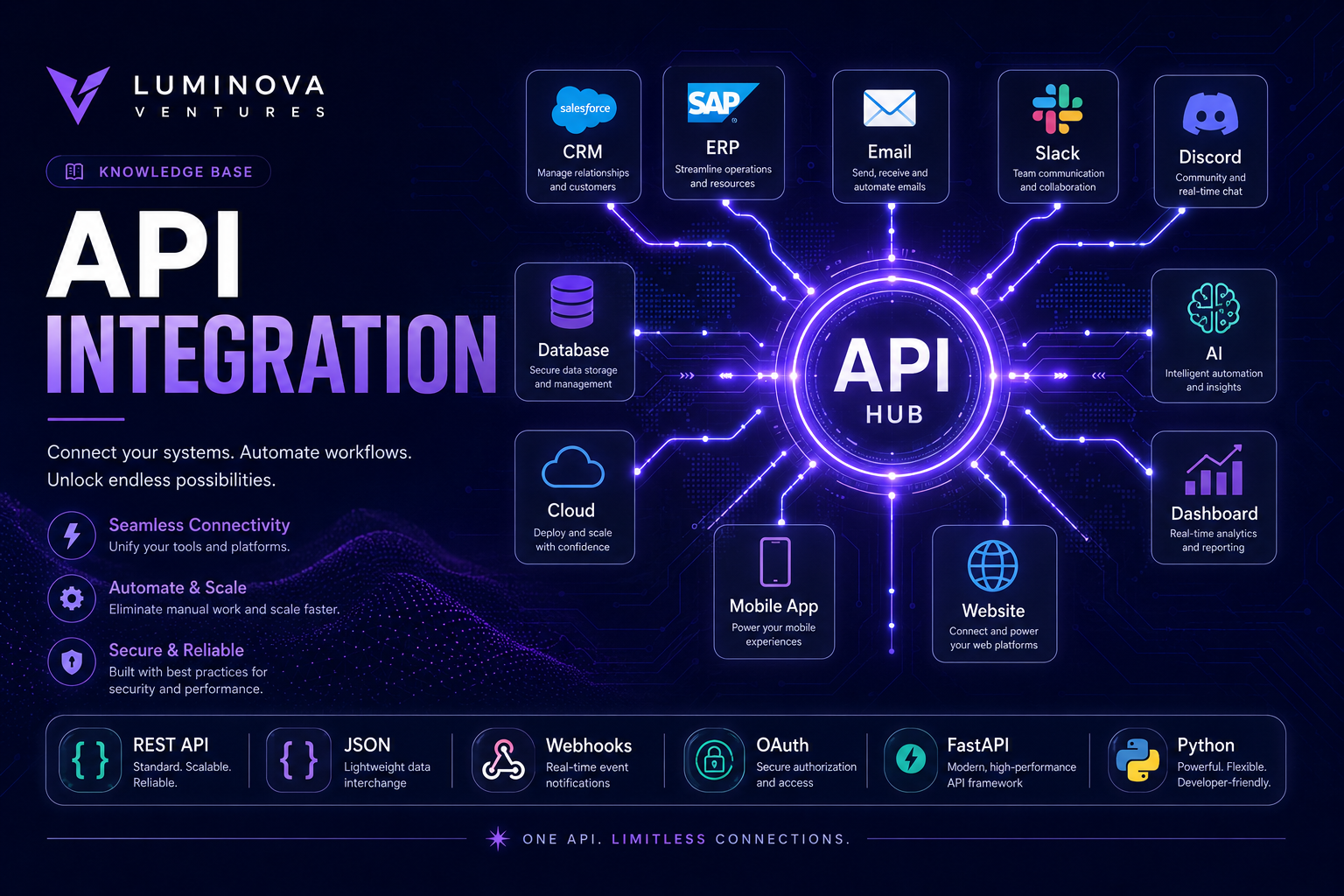
In 30 Seconds
- Business API Integration connects disconnected software systems.
- As a result, APIs move data automatically between tools, databases and dashboards.
- Integrated systems reduce manual work, duplicate data and operational delays.
- Most importantly, the best integrations follow real business workflows instead of random tool connections.
What Is Business API Integration?
Business API Integration is the process of connecting different software systems through application programming interfaces. An API allows one system to send, receive or update information inside another system using structured rules.
For a business, this means that tools can communicate automatically. A website form can create a CRM record, a payment system can trigger an invoice, a database can update a dashboard and an AI assistant can process customer information without manual copying.
Modern companies often use many different platforms. Without integration, teams waste time moving information between tools. With the right API architecture, those systems become part of one connected workflow.
Why API Connections Matter for Modern Businesses
Most operational problems do not come from a lack of software. Instead, they come from disconnected software. For example, businesses often use CRMs, spreadsheets, email tools, payment platforms, dashboards and internal systems that do not communicate properly.
When systems are disconnected, employees become the integration layer. They copy data, export spreadsheets, send updates, check statuses and fix mistakes caused by duplicated information.
API connections remove that friction by allowing systems to exchange information automatically and consistently.
Less Manual Work
Data moves between systems automatically, so employees do not need to copy the same information by hand.
Cleaner Data
Integrated systems reduce duplicate records, missing information and outdated reports.
Faster Workflows
Business processes continue instantly when one system triggers another.
Better Visibility
Dashboards can display information from multiple platforms in one place.
Common API Integration Use Cases
API integration can support many operational workflows. The highest-value use cases usually involve repeated data movement, reporting, customer communication or internal coordination between multiple systems.
- CRM automation for leads, contacts and customer updates.
- Form integrations between websites, databases and email tools.
- Dashboard reporting from multiple business systems.
- AI workflows that send structured data to language models.
- Payment automation connected with invoices and customer records.
- Notification systems for Slack, Discord, Telegram or email.
- Database synchronization between internal and external platforms.
- Order processing across e-commerce, fulfillment and support tools.
- Analytics pipelines for real-time business intelligence.
- Internal tool automation for operations and support teams.
Example API Workflow
- A customer submits a form on the website.
- Then, the system validates the form data automatically.
- Next, the CRM receives the new lead.
- After that, an AI assistant summarizes the request.
- The database stores the customer record.
- Meanwhile, the sales team receives a notification.
- Finally, the dashboard updates the new lead count in real time.
Manual Data Transfer vs API Automation
Manual data transfer may work at the beginning, but it becomes inefficient as a business grows. Every repeated copy-and-paste action creates time cost, error risk and dependency on employees remembering every step.
With API automation, the business defines the process once and executes it consistently. Therefore, this approach works especially well when accuracy, speed and repeatability matter.
Manual Work vs API Automation
Manual Work
- Copying information between systems
- Delayed updates
- Higher error risk
- Duplicate records
- Hard to scale
API Automation
- Automatic data exchange
- Real-time updates
- Structured workflows
- Cleaner records
- Scalable operations
Technology Stack for Business API Integration
Reliable integrations require more than a simple connection between two tools. In practice, a professional setup usually includes authentication, data validation, error handling, logging, retries, monitoring and secure storage.
Teams often use Python and FastAPI to create integration layers because these technologies are flexible, scalable and suitable for connecting APIs, databases, AI services and internal business platforms.
When Should a Company Invest in API Integration?
A company should invest in API integration when employees repeatedly move information between systems, when reporting depends on manual exports or when disconnected tools create delays in customer service, sales or operations.
The strongest signal is repetition. If the same data is copied, reformatted or checked manually every week, the process is probably ready for automation.
- Teams copy data between platforms every day.
- Reports require manual exports from multiple tools.
- Scattered data delays customer requests.
- Sales, support and operations use systems that do not communicate.
- Dashboards do not update automatically.
- The business wants to add AI automation to existing workflows.
- Employees spend time checking whether information stays synchronized.
- Operational decisions depend on outdated or incomplete data.
API Integration and AI Automation
APIs become even more valuable when combined with artificial intelligence. For example, a workflow can collect structured business data, send it to an AI system, receive a classification or summary and then update another platform automatically.
In addition, customer messages can be classified by intent, support tickets can be summarized, documents can be processed and leads can be scored before they reach the sales team.
Modern AI services such as OpenAI can be integrated directly into business workflows through APIs. As a result, companies can automate analysis, writing, classification and decision support.
How Luminova Ventures Builds API Integrations
Luminova Ventures builds Business API Integration workflows around real operational problems. The goal is not to connect tools for the sake of technology, but to reduce manual work, improve data flow and make business systems easier to manage.
Each integration starts with understanding the current workflow, identifying repetitive steps and designing a reliable automation layer between the systems that matter most.
- Workflow Automation Explained
- Business Process Automation
- Python Infrastructure Automation
- AI Business Assistant
- Free Automation Audit
Frequently Asked Questions About Business API Integration
What is Business API Integration?
Business API Integration connects software systems through APIs so they can exchange information automatically without manual copying, exporting or updating.
Which systems can be connected with APIs?
CRMs, databases, dashboards, websites, payment tools, email systems, AI models, cloud platforms and internal business software can often be connected through APIs.
Does API integration require custom software?
Simple integrations can sometimes be created with no-code tools, but complex workflows usually require custom software when validation, security, logging and scalability are important.
How do I know which process should be integrated first?
The best starting point is usually the process that creates the most repeated manual work, causes the most errors or blocks teams from making faster decisions.
Connect Your Business Systems
Request a free Automation Audit and discover where Business API Integration can reduce manual work, improve data flow and connect your software stack.
Request Free Automation AuditLooking for more practical AI, automation and software development resources?
← Back to Knowledge Base